
Email header analyzer
Paste an email's headers or drop the email file, and see the route it took, any delays on the way, and the SPF, DKIM and DMARC results its servers recorded. Free, with no account.
Quick answer
To read an email's headers, paste them above (from "Show original" or "View source" in your email app) or drop the email file. You see the servers it passed through with any delays, the SPF, DKIM, DMARC and ARC results the receiving server recorded, and whether the From, Return-Path and Reply-To addresses differ. It describes what the servers wrote: it doesn't look anything up again, so it can't say whether an email is safe.
What you get
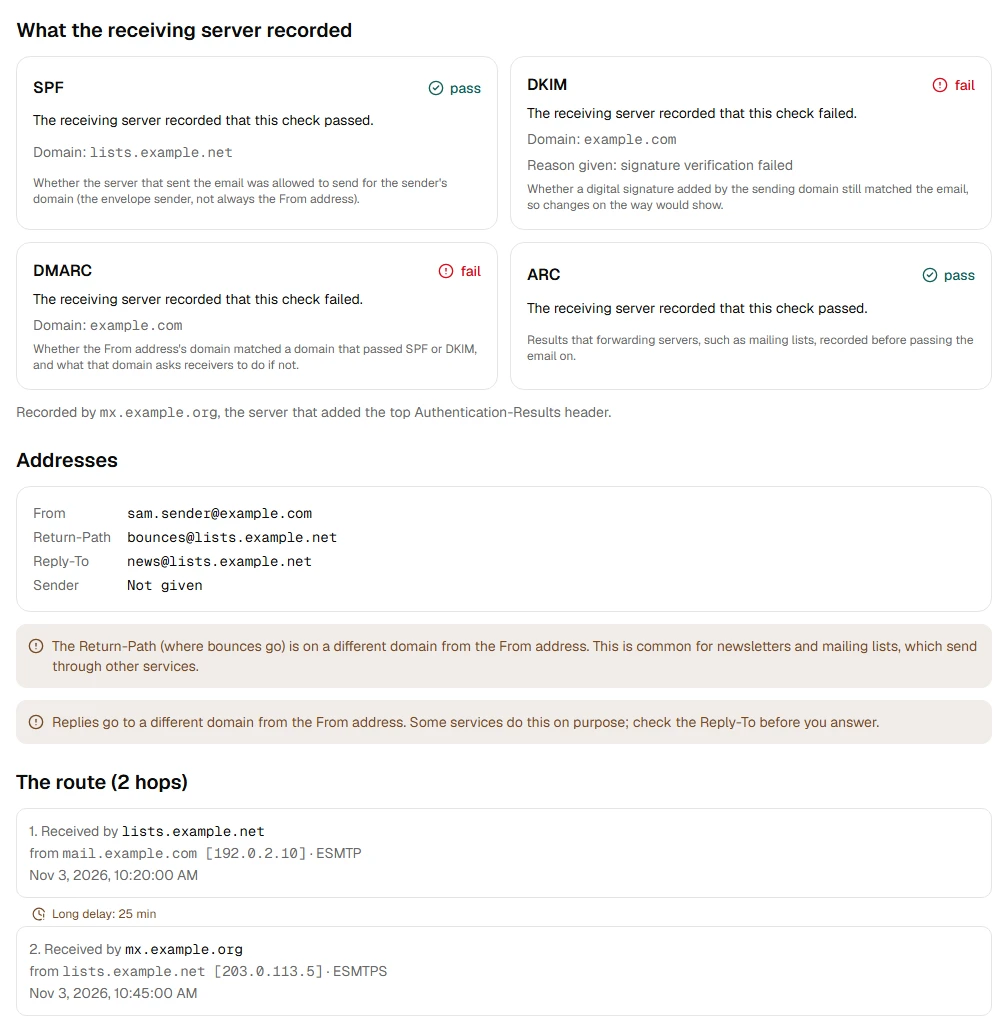
- See every server an email passed through, in order
- Spot long delays, and servers whose clocks disagree
- Read the SPF, DKIM, DMARC and ARC results the receiving server recorded
- See when the From, Return-Path and Reply-To addresses are on different domains
- Analyze headers you paste, or read them straight from an email file
Step by step
- Step 1
Paste the headers or drop the email
From "Show original" in your email app, or an .msg, .eml or .emlx file.
- Step 2
Read the route
Each server the email passed through, when, and how long each step took, with long delays pointed out.
- Step 3
Read the checks
SPF, DKIM, DMARC and ARC as the receiving server recorded them, each explained in one line.
Supported files and limits
| File | Up to | At a time |
|---|---|---|
| .msg (Outlook email) | 50 MB per file | One file |
| .eml (email) | 50 MB per file | One file |
| .emlx and .partial.emlx (Apple Mail) | 50 MB per file | One file |
| .oft (Outlook template) | 50 MB per file | One file |
These are technical limits, so your browser doesn't run out of memory. There's no account, plan or fee.
Troubleshooting
If you see:
No headers were found. Paste the part of the email before the first blank line. An Outlook draft or template keeps no internet headers.
What to do: Copy them from Gmail's Show original or Outlook's Internet headers box (File › Properties), from the top down to the first empty line. Or drop the email file itself.
If you see:
This is a PDF, not an email file. Choose an MSG, EML, EMLX or OFT file.
What to do: Choose the email file itself, not a document that was attached to it or a printout of it.
If you see:
This email file seems to be damaged, so we can't open it. Try saving or downloading the email again.
What to do: Save the email again from the app it came from. If it still won't open, use Report a problem: it sends the error code, never your file.
If you see:
This file is 72.3 MB. Inboxglass opens email files up to 50 MB. If it's a whole mailbox export, open single emails instead.
What to do: Single emails are rarely over 50 MB. If it's a whole mailbox, open it with the MBOX viewer, which takes up to 20 GB.
Something else? Use the problem report form. It sends the error code and your description, never your file.
Other ways to do it
Google Admin Toolbox Messageheader
Paste the headers into Google's Messageheader page and click Analyze the header above.
When it makes sense: You want a second opinion, and the headers aren't sensitive.
Microsoft Message Header Analyzer
Microsoft's own security guides point to its Message Header Analyzer web page, mha.azurewebsites.net, for reading headers.
When it makes sense: You use Microsoft 365 and want Microsoft's own tool.
Your privacy
Your files are processed on your device and never uploaded. The tool runs in a sealed, ad-free area of the page that nothing else on the page can access, and it can't connect to other websites. Nothing about your emails is stored on our domain. We can't see your emails — they never reach our servers.
Check it yourselfFrequently asked questions
How do I read email headers?
In Gmail, open the email and choose More › Show original. In Outlook, open it and choose File › Properties: the headers are in the Internet headers box. Copy everything down to the first empty line and paste it here. Or drop the email file.
How do I check SPF, DKIM and DMARC in an email?
Paste its headers here. The cards show what the receiving server recorded for each check, with one line saying what it means.
What are SPF, DKIM and DMARC?
SPF checks the sending server was allowed to send for the sender's domain. DKIM checks a digital signature added by the sending domain. DMARC checks the From address's domain matches one that passed SPF or DKIM, and says what to do if it doesn't.
How do I find where an email really came from?
Read the route from the first hop: the earliest server is the one the email started from. Lower headers can be faked by the sender, so trust the hops added by your own provider most.
Why was this email delayed?
The route shows how long each step took, and points out delays of 10 minutes or more. A long gap usually means a busy server or a spam filter holding the email.
Why are the From and Return-Path on different domains?
Often for ordinary reasons: newsletters and mailing lists send through services that handle bounces for them. It's worth a look when you didn't expect it, together with the DMARC result.
Does this tell me if an email is safe?
No. It shows what the servers recorded. It doesn't look anything up again, and a sender can add fake headers lower down. If an email asks for money, passwords or urgent action, check with the sender another way.
Is my email uploaded anywhere?
No. Your files are processed on your device and never uploaded. We can't see your emails — they never reach our servers. Each tool runs in a sealed, ad-free area of the page that other code on the page can't access, and nothing about your emails is stored on our domain.
Related tools
Last updated by The Inboxglass team