
Convert EML to TXT
Get a saved email as plain text you can search, paste or archive. No email program needed.
Quick answer
To convert an EML file to plain text, drop it in the box above: a .txt file downloads as soon as the email is read. Unlike opening the .eml in a text editor, you get readable text: the header, then the message decoded from its email encoding, then the attachments by name and size. Every language is kept.
What you get
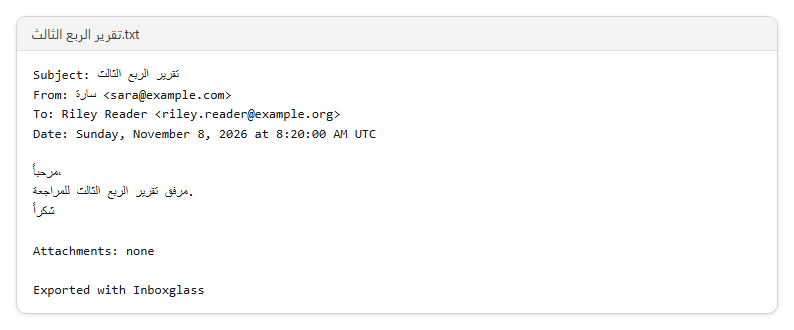
- Get the subject, sender, recipients and date at the top
- Get the message as plain text, even from a formatted email
- See every attachment listed by name and size
- Search, copy or paste the text anywhere
- Keep Arabic, Urdu and other languages intact
Step by step
- Step 1
Choose your .eml file
Drop it on the box above, or click Choose a file.
- Step 2
Your text file downloads
As soon as the email is read, a .txt file is saved with the header and the message.
- Step 3
Open it anywhere
Any text editor opens it, on any computer, tablet or phone.
Supported files and limits
| File | Up to | At a time |
|---|---|---|
| .eml (email) | 50 MB per file | One file |
These are technical limits, so your browser doesn't run out of memory. There's no account, plan or fee.
Troubleshooting
If you see:
This is an MSG file. This tool opens EML files.
What to do: It's an email file, just another format. Open it from the homepage, which recognises every format, or with the tool for that format.
If you see:
This file is named like an EML file, but its contents don't match. It may be damaged or only partly downloaded. Try saving the email again.
What to do: The download was probably interrupted, or the file was renamed. Save or download the email again from where you got it.
If you see:
This is a PDF, not an email file. Choose an EML file.
What to do: Choose the email file itself, not a document that was attached to it or a printout of it.
If you see:
This email file seems to be damaged, so we can't open it. Try saving or downloading the email again.
What to do: Save the email again from the app it came from. If it still won't open, use Report a problem: it sends the error code, never your file.
If you see:
This file is 72.3 MB. Inboxglass opens email files up to 50 MB. If it's a whole mailbox export, open single emails instead.
What to do: Single emails are rarely over 50 MB. If it's a whole mailbox, open it with the MBOX viewer, which takes up to 20 GB.
If you see:
We couldn't read this file. If it's in cloud storage or on a network drive, save it to your device first, then try again.
What to do: Download the file to your computer or phone first (from OneDrive, Google Drive, Dropbox or a network folder), then choose that copy.
Something else? Use the problem report form. It sends the error code and your description, never your file.
Other ways to do it
A text editor
An .eml file is already text, but the message is often encoded (base64 or quoted-printable), so it can look like gibberish and non-English text won't read.
When it makes sense: The email is plain English text and you only need to search it.
Thunderbird with ImportExportTools NG
Import the .eml file with the add-on, then export the message as plain text.
When it makes sense: You use Thunderbird already.
Your privacy
Your files are processed on your device and never uploaded. The tool runs in a sealed, ad-free area of the page that nothing else on the page can access, and it can't connect to other websites. Nothing about your emails is stored on our domain. We can't see your emails — they never reach our servers.
Check it yourselfFrequently asked questions
How do I convert an EML file to a text file?
Drop it on the box at the top of this page. The .txt file downloads as soon as the email is read, with no email program and no account.
Why does my .eml file look strange in Notepad?
Emails are often stored encoded, so the message shows as long lines of letters and numbers. This tool decodes it and writes the readable text.
What's in the text file?
The subject, sender, recipients and date, then the message as plain text, then a list of the attachments with their names and sizes. Formatting and images are left out, and the attachments themselves aren't included.
Will other languages show correctly?
Yes. The file is saved as UTF-8, which keeps Arabic, Urdu, Chinese and every other language, with Windows line breaks so it opens cleanly in Notepad too.
How do I get the attachments too?
The text file lists them by name and size. To save the files themselves, open the email in the EML viewer.
Is my email uploaded anywhere?
No. Your files are processed on your device and never uploaded. We can't see your emails — they never reach our servers. Each tool runs in a sealed, ad-free area of the page that other code on the page can't access, and nothing about your emails is stored on our domain.
Related tools
Last updated by The Inboxglass team