
Convert MBOX to EML
Choose an .mbox mailbox, pick the emails (all of them, a search, or the ones you tick) and get each one as its own .eml file, exactly as it was sent. Free, with no account.
Quick answer
To convert an MBOX file to EML, choose the mailbox above and pick the emails: all of them, a search, or the ones you tick. Each one is saved as its own .eml file, exactly as it was sent, in one ZIP, named by date, sender and subject and in folders by label or year if you like. Nothing is re-encoded, and even a large mailbox needs little memory.
What you get
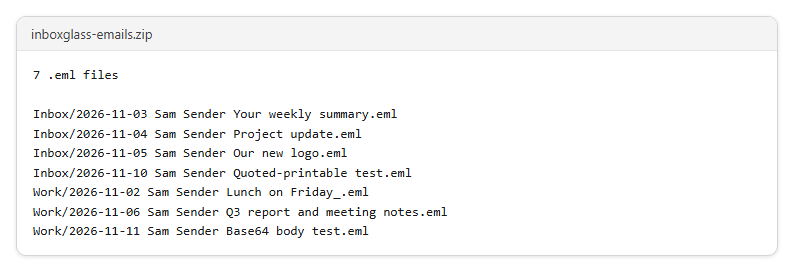
- Save every email of a mailbox as its own .eml file
- Export only a search, a label, a date range or the emails you tick
- Name files by date, sender and subject, or by number
- Put them in a folder per Gmail label or per year
- Open the .eml files in almost any email app, or here in the EML viewer
Step by step
- Step 1
Choose your .mbox file
From Gmail Takeout, Thunderbird or Apple Mail. A mailbox you've opened here before is ready at once.
- Step 2
Pick the emails
All of them, the results of a search or filter, or the ones you tick in the list.
- Step 3
Download the ZIP
One .eml file per email, named by date, sender and subject or by number, in folders by label or year if you like.
Supported files and limits
| File | Up to | At a time |
|---|---|---|
| .mbox (a whole mailbox) | 20 GB, and 50 MB per email in it | One mailbox |
These are technical limits, so your browser doesn't run out of memory. There's no account, plan or fee.
Troubleshooting
If you see:
This isn't an MBOX mailbox. Choose an .mbox file, like the one in a Gmail Takeout export. For a single email, use the EML viewer.
What to do: In a Google Takeout export, the mailbox is the .mbox file inside the ZIP: unzip it first. From Apple Mail, choose the mbox file inside the exported folder.
If you see:
This file is 24.1 GB. Inboxglass opens mailboxes up to 20 GB. If your export is bigger, choose fewer labels in Google Takeout and export again.
What to do: In Google Takeout, export fewer labels or a shorter period, so each file stays under 20 GB.
If you see:
We couldn't read this file. If it's in cloud storage or on a network drive, save it to your device first, then try again.
What to do: Download the file to your computer or phone first (from OneDrive, Google Drive, Dropbox or a network folder), then choose that copy.
If you see:
This email couldn't be read from the mailbox file. If the file was moved or changed, choose it again.
What to do: The mailbox file was moved, renamed or changed since it was opened. Choose it again.
Something else? Use the problem report form. It sends the error code and your description, never your file.
Other ways to do it
Thunderbird with ImportExportTools NG
Import the .mbox file with the add-on, then export the folder's messages as .eml files.
When it makes sense: You use Thunderbird and want to keep working with the emails there.
Apple Mail
Import the mailbox with File › Import Mailboxes, then drag emails to the desktop to save them as .eml files.
When it makes sense: You're on a Mac and only need a few emails.
Your privacy
Your files are processed on your device and never uploaded. The tool runs in a sealed, ad-free area of the page that nothing else on the page can access, and it can't connect to other websites. Nothing about your emails is stored on our domain. We can't see your emails — they never reach our servers.
Check it yourselfFrequently asked questions
How do I convert an MBOX file to EML files?
Choose the .mbox file on this page, pick the emails, then click Make EML files. You download one ZIP with an .eml file per email.
How do I get single emails out of an MBOX?
Search or tick the emails you need, choose The emails you ticked under What to export, and export only those.
Are the .eml files changed in any way?
No. Each file is the email's exact bytes from your mailbox, without the mailbox's own "From " line and the blank line after the email, and with the mailbox's ">From" protection taken off again. Gmail's own headers, like X-Gmail-Labels, stay in the email.
How do I open an .eml file?
The new Outlook for Windows, Outlook on the web and Outlook for Mac (version 16.58 or later) open .eml files. Or open it here in the EML viewer.
Why do some names have an underscore?
Characters that aren't allowed in file names, like ? and /, are replaced, so "Lunch on Friday?" becomes "Lunch on Friday_.eml". The email inside is unchanged.
Is my email uploaded anywhere?
No. Your files are processed on your device and never uploaded. We can't see your emails — they never reach our servers. Each tool runs in a sealed, ad-free area of the page that other code on the page can't access, and nothing about your emails is stored on our domain.
Related tools
Last updated by The Inboxglass team