
Extract attachments from many emails
Drop a folder of emails and get all their attachments in one ZIP, each file once, with a list of where each came from. Free, with no account.
Quick answer
To extract attachments from many emails, choose what to keep, then drop your .msg, .eml or winmail.dat files or a whole folder, up to 500 at a time. Every attachment comes out once in one ZIP, with index.csv listing the email each file came from. Attached emails are opened too, so nothing inside them is missed.
What you get
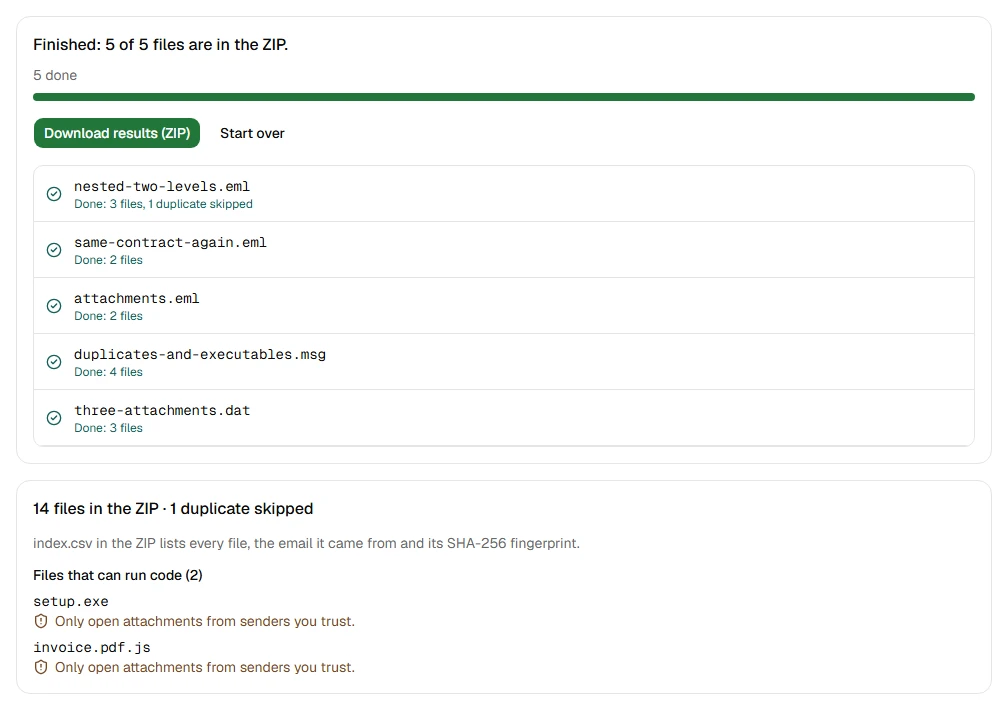
- Get the attachments out of up to 500 emails at a time, a whole folder with its subfolders
- Get the attachments out of a whole MBOX mailbox, like a Gmail Takeout export
- Keep only PDFs, images, Office documents, archives or other files
- Skip small files, and logos and signature pictures inside the message
- Open emails attached to emails, one or two levels deep
- Keep each file once, even when it was sent many times
- See which files can run code before you open them
Step by step
- Step 1
Choose what to keep
File types, a minimum size, pictures inside the message, and how the files are named.
- Step 2
Drop your emails or a folder
MSG, EML and winmail.dat files, up to 500 at a time, or MBOX mailboxes. Attached emails are opened too.
- Step 3
Download one ZIP
Every attachment once, plus index.csv: which email each file came from, its size and its fingerprint.
Supported files and limits
| File | Up to | At a time |
|---|---|---|
| .msg (Outlook email) | 50 MB per file | Up to 500 files, 2 GB in total |
| .eml (email) | 50 MB per file | Up to 500 files, 2 GB in total |
| winmail.dat (Outlook attachments) | 50 MB per file | Up to 500 files, 2 GB in total |
| .oft (Outlook template) | 50 MB per file | Up to 500 files, 2 GB in total |
| .emlx and .partial.emlx (Apple Mail) | 50 MB per file | Up to 500 files, 2 GB in total |
These are technical limits, so your browser doesn't run out of memory. There's no account, plan or fee.
Troubleshooting
If you see:
You chose 612 files. You can open up to 500 at a time. Choose fewer, then add the rest as another batch.
What to do: Split them into folders of up to 500 files and run one batch per folder.
If you see:
These files add up to 2.4 GB. You can open up to 2 GB at a time. Choose fewer, then add the rest as another batch.
What to do: Run the files in two or more batches. Each batch makes its own ZIP.
If you see:
This email file seems to be damaged, so we can't open it. Try saving or downloading the email again.
What to do: Save the email again from the app it came from. If it still won't open, use Report a problem: it sends the error code, never your file.
If you see:
This is a PDF, not an email file. Choose an MSG, EML, winmail.dat, OFT or EMLX file.
What to do: Choose the email file itself, not a document that was attached to it or a printout of it.
If you see:
This file is 72.3 MB. Inboxglass opens email files up to 50 MB. If it's a whole mailbox export, open single emails instead.
What to do: Single emails are rarely over 50 MB. If it's a whole mailbox, open it with the MBOX viewer, which takes up to 20 GB.
If you see:
Only open attachments from senders you trust.
What to do: The file is a program or a script, like .exe, .js or an Office file with macros. Inboxglass only saves it, never opens it. Open it only if you trust the sender and expected it.
Something else? Use the problem report form. It sends the error code and your description, never your file.
Other ways to do it
Classic Outlook for Windows
In each email, click the arrow next to an attachment and choose Save All Attachments, one email at a time.
When it makes sense: You only have a handful of emails.
Apple Mail on a Mac
In each email, move the pointer over the header, click the Attach button, then choose Save All.
When it makes sense: You have a few emails already in Mail.
Your privacy
Your files are processed on your device and never uploaded. The tool runs in a sealed, ad-free area of the page that nothing else on the page can access, and it can't connect to other websites. Nothing about your emails is stored on our domain. We can't see your emails — they never reach our servers.
Check it yourselfFrequently asked questions
How do I save all attachments from many emails at once?
Drop the emails or their folder on this page. Every attachment comes out in one ZIP, each file once, with index.csv saying which email it came from.
How do I extract attachments from MSG files in bulk?
The same way: drop up to 500 .msg files, or a folder of them, and download one ZIP. EML and winmail.dat files can be mixed in.
How are duplicates found?
By content, not by name. Each file gets a SHA-256 fingerprint; two files with the same fingerprint are the same file, so only the first is kept. Two different files with the same name are both kept, as "report.pdf" and "report (2).pdf".
Does it open emails attached to emails?
Yes, one level deep by default, or two if you choose. The attached email file itself is kept too. Deeper isn't offered: each level needs more of your browser's memory, and long chains of forwarded emails can hide thousands of files. At most 1,000 files are taken from one email.
What does "can run code" mean?
Programs and scripts, like .exe, .js, .bat or Office files with macros. Opening one can install harmful software, so only open them if you trust the sender. Inboxglass never opens attachments; it only saves them.
Is my email uploaded anywhere?
No. Your files are processed on your device and never uploaded. We can't see your emails — they never reach our servers. Each tool runs in a sealed, ad-free area of the page that other code on the page can't access, and nothing about your emails is stored on our domain.
Related tools
Last updated by The Inboxglass team