
Rename email files by date, sender and subject
Turn names like "message(3).msg" into "2026-11-02 Sara Ahmed Q3 plan.msg". Build the name from parts, check every new name, then download the files in a ZIP. Free, with no account.
Quick answer
To rename many email files at once, drop your .msg, .eml or .emlx files or their folder, up to 500 at a time. Build the name from the date, time, sender, sender's domain, subject and a counter, and check every old and new name side by side. Then download the files in a ZIP: only their names change.
What you get
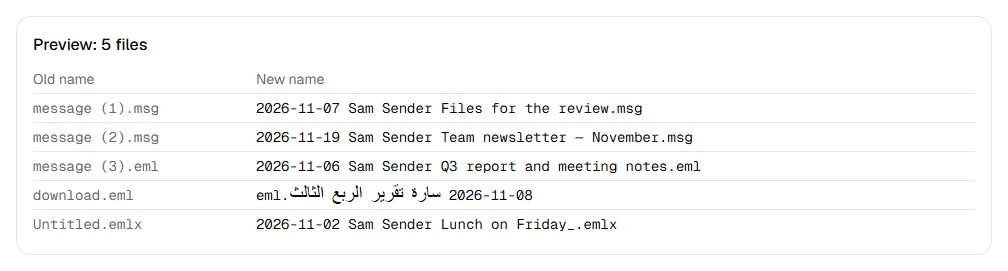
- Rename up to 500 email files at a time
- Use the date, time, sender, sender's domain, subject and a counter
- Choose the date format and what goes between the parts
- See every new name before anything is made
- Keep the files exactly as they were: only the names change
Step by step
- Step 1
Drop your email files
MSG, EML and EMLX files, up to 500 at a time, or a whole folder.
- Step 2
Build the name
Pick the parts (date, time, sender, sender's domain, subject, counter), their order, the date format and what goes between them.
- Step 3
Check and download
See every old and new name side by side, then get the files in a ZIP, unchanged inside.
Supported files and limits
| File | Up to | At a time |
|---|---|---|
| .msg (Outlook email) | 50 MB per file | Up to 500 files, 2 GB in total |
| .eml (email) | 50 MB per file | Up to 500 files, 2 GB in total |
| .emlx and .partial.emlx (Apple Mail) | 50 MB per file | Up to 500 files, 2 GB in total |
These are technical limits, so your browser doesn't run out of memory. There's no account, plan or fee.
Troubleshooting
If you see:
You chose 612 files. You can open up to 500 at a time. Choose fewer, then add the rest as another batch.
What to do: Split them into folders of up to 500 files and run one batch per folder.
If you see:
These files add up to 2.4 GB. You can open up to 2 GB at a time. Choose fewer, then add the rest as another batch.
What to do: Run the files in two or more batches. Each batch makes its own ZIP.
If you see:
This email file seems to be damaged, so we can't open it. Try saving or downloading the email again.
What to do: Save the email again from the app it came from. If it still won't open, use Report a problem: it sends the error code, never your file.
If you see:
This is a PDF, not an email file. Choose an MSG, EML or EMLX file.
What to do: Choose the email file itself, not a document that was attached to it or a printout of it.
If you see:
This file is 72.3 MB. Inboxglass opens email files up to 50 MB. If it's a whole mailbox export, open single emails instead.
What to do: Single emails are rarely over 50 MB. If it's a whole mailbox, open it with the MBOX viewer, which takes up to 20 GB.
Something else? Use the problem report form. It sends the error code and your description, never your file.
Other ways to do it
Outlook's Save As
In the new Outlook and Outlook on the web, a saved email's file name is its title by default. Dates and senders aren't part of it.
When it makes sense: You save emails one at a time and the subject is enough.
A bulk file renamer
PowerRename (Microsoft PowerToys) on Windows and the Finder's Rename on a Mac rename many files at once, with find and replace, added text or numbers.
When it makes sense: You only need numbers or a fixed prefix, not the email's details.
Your privacy
Your files are processed on your device and never uploaded. The tool runs in a sealed, ad-free area of the page that nothing else on the page can access, and it can't connect to other websites. Nothing about your emails is stored on our domain. We can't see your emails — they never reach our servers.
Check it yourselfFrequently asked questions
How do I rename many MSG files by date and subject?
Drop them on this page; the default pattern is the date, sender and subject. Change the parts if you like, check the preview, and download the ZIP.
How do I give saved emails clear names?
Use the email's own date, sender and subject, as this tool does. Dates are written year-month-day by default, so the files sort in date order.
Are my email files changed?
No. Only their names change. Each file goes into the ZIP exactly as it was, byte for byte.
What happens to slashes, emoji or very long subjects?
Characters that aren't allowed in file names, like / \ : * ? " < > |, become an underscore. Emoji and letters in any language stay. Names longer than 100 characters are shortened at a whole character, and the extension is kept.
What if two emails get the same name?
The second one gets " (2)", the third " (3)", and so on, so no file overwrites another.
Which time zone is used for the date and time?
Your device's, the same as the time shown when you open the email here.
Is my email uploaded anywhere?
No. Your files are processed on your device and never uploaded. We can't see your emails — they never reach our servers. Each tool runs in a sealed, ad-free area of the page that other code on the page can't access, and nothing about your emails is stored on our domain.
Related tools
Last updated by The Inboxglass team