
MSG vs EML: what's the difference?
MSG and EML both hold one email, but they're built very differently. Which apps open them, which to keep, and how to open either.
Quick answer
MSG is Microsoft Outlook's own format for a saved email and works best in Outlook for Windows. EML is the open standard that most email apps read. Both hold the same message and attachments, and you can open either one in your browser.
On this page (7)
You have an email saved as a file, and it ends in either .msg or .eml. Both hold a single email with its attachments. But they come from different places, open in different apps and age differently. Here's what you need to know, without the technical detail.
The short answer
- MSG is Microsoft Outlook's own format for a saved email. It works best with Outlook for Windows.
- EML is the standard format for email on the internet. Most email apps can open it.
Both contain the sender, recipients, date, subject, message and attachments. Neither is "better" in general. Which one you want depends on who will open it and how long you need to keep it.
Not sure which one you have? Look at the end of the file name. If your computer hides file extensions, you can turn them on. On Windows 11, open File Explorer and select View → Show → File name extensions. On a Mac, choose Finder → Settings, click Advanced and select Show all filename extensions.
If you just need to read one, either file opens in your browser with the MSG viewer or the EML viewer.
Side by side
Where it comes from
- MSG: Microsoft Outlook. Microsoft's description of the format lists the Outlook versions from Outlook 2003 to Outlook LTSC 2024.
- EML: for example Apple Mail, when you save an email as Raw Message Source or drag it to your desktop.
What's inside
- MSG: a structured binary file. Text editors show mostly unreadable characters.
- EML: plain text that follows the internet's email standards. You can open it in a text editor and read the headers.
Who can open it
- MSG: mainly Outlook for Windows, plus viewers like Inboxglass.
- EML: most email apps, plus viewers like Inboxglass.
Extra Outlook details
- MSG: stores every property the item had in Outlook.
- EML: keeps what was actually sent: headers, message and attachments.
MSG: Outlook's own format
Microsoft publishes how the format works, but in practice it was built for one app: Outlook.
That's its strength and its weakness. On a Windows computer where the desktop Outlook app is set to open .msg files, a .msg file opens in Outlook with a double-click. Some records and document management systems that are built around Outlook expect .msg files for that reason.
Outside that world, MSG can be awkward, because it was designed around Outlook first. If the app you use doesn't open it, a browser-based viewer is the quickest way to read it.
If you're on a Mac with a .msg file, see How to open an MSG file on a Mac.
EML: the open standard
EML follows the same internet standards that every email uses on its way from sender to recipient. In a way, an .eml file is the email exactly as it travelled.
Because it's a standard, many different apps can read it, today and in the future. That makes it a safe choice for keeping emails long term, and a friendly one for sharing with people who use other email apps.
Microsoft's guide to saving an Outlook message as a .eml file includes steps for the new Outlook for Windows: select the email, then More actions → Save as. If someone at work asks you for .msg instead, see The new Outlook saves emails as EML.
Which one should you keep?
It depends on what you'll do with the email.
- To read it or share it with anyone: EML, or better still a PDF. A PDF opens everywhere and looks the same for everyone.
- To keep it for years: EML is the safer bet, because it's an open standard. Many people also keep a PDF next to it for easy reading.
- For a system that requires it: use whatever that system asks for. If it says .msg, it really does mean .msg.
- For legal or HR records: ask the person or team collecting them. They often want a PDF with the full header, sometimes together with the original file.
You don't have to choose just one. Keeping the original file and a PDF covers most needs.
Can you convert one into the other? From MSG to EML, yes: MSG to EML turns a .msg into a standard .eml, attachments included. From EML to MSG, not yet; it's on our plans. If a system needs .msg, Outlook on the web can download an email from your mailbox: select it, then More actions → Download, and it's saved as an .eml or .msg file. Check which one you got before you send it. Either format can also become a PDF, a text file or a web page.
Open either one
Inboxglass opens both formats in your browser, with nothing to install and no account needed:
- Go to the MSG viewer or the EML viewer. The homepage accepts both.
- Drag the file onto the box, or click Choose a file.
- Read the email and download its attachments. For a PDF, use MSG to PDF or EML to PDF instead.
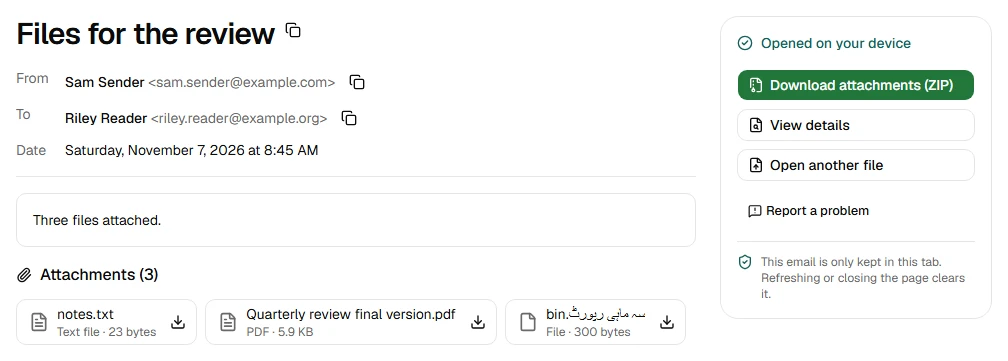
Your files are processed on your device and never uploaded. When you close the tab, the email is gone from the page.
If a file won't open, it may be damaged or only partly downloaded. Try saving the email again. If it still doesn't work, use Report a problem. We never ask for your file.
Sources
- Microsoft Support: File Explorer in Windows
- Apple Support: Show or hide filename extensions on Mac
- Apple Support: Save emails as files or PDFs in Mail on Mac
- Microsoft Learn: [MS-OXMSG]: Outlook Item (.msg) File Format
- Microsoft Learn: [MS-OXMSG]: Overview
- Microsoft Learn: [MS-OXMSG]: Appendix A: Product Behavior
- Microsoft Support: Double-clicking a .msg file opens an unexpected version Outlook
- Microsoft Support: Save an Outlook message as a .eml file, a PDF file, or as a draft
Try the tool
MSG viewer
Read Outlook .msg emails and save their attachments. No account needed.
Your files are processed on your device and never uploaded.
Also for this:EML viewer