
Outlook saved your email as EML, but you need MSG: what to do
Outlook gave you an .eml file and someone asks for .msg. When EML is fine, what to ask first, and your options with Microsoft's own Outlook apps.
Quick answer
An .eml file holds the same email as an .msg: sender, recipients, date, message and attachments. Before converting anything, ask what is really needed, since an .eml or a PDF often does the job. If it must be .msg, Microsoft says Outlook on the web can download an email as an .eml or .msg file.
On this page (8)
You saved an email from Outlook, and it came out as an .eml file instead of the .msg file you're used to. Maybe a colleague, your IT team or an online form says it needs MSG. This guide explains what changed, when EML is perfectly fine, and what you can do when it isn't.
What changed
Microsoft is moving Outlook for Windows users from classic Outlook to the new Outlook for Windows, in stages: first people can try it, then it's on by default, and finally there's no switching back. The new app works differently in many small ways, and saving emails is one of them.
In the new Outlook, you save an email by selecting it and choosing More actions → Save as. Microsoft describes these steps in its guide to saving an Outlook message as a .eml file. If the file you got ends in .eml, that's the format you have.
Both files hold the same email: sender, recipients, date, subject, the message and its attachments. They're just packaged differently. MSG is Microsoft's own format. EML follows the internet's email standards, so many email apps can read it.
So nothing is missing from your email. The question is only whether the person or system receiving it can open an .eml file.
Is EML good enough?
Often, yes. An .eml file is plain text that follows the internet's email standards. Microsoft lists these ways to open one, and a browser works too:
- The new Outlook for Windows: drag the .eml file onto the reading pane, or right-click it in File Explorer and choose Open with → Outlook (new)
- Outlook on the web: drag the .eml file onto the reading pane
- Any web browser, with an EML viewer like the EML viewer on Inboxglass
If someone just needs to read the email, an .eml file usually works. Send it and tell them it's a saved email they can open in their email app or a browser.
Ask what they actually need
When someone asks for "an MSG file", it's worth asking why. The answer decides the best fix.
- They need to read it. An .eml file or a PDF will do.
- They need it as a record, for example in a case file, an audit or an HR folder. A PDF is often what they really want, because anyone can open it years from now.
- Their system only accepts .msg. Some document management and records systems are built around Outlook and import .msg files only. In that case you do need MSG, and the options below help.
- They want to forward it from Outlook. Forwarding the original email from your mailbox is simpler than saving and attaching a file.
A one-line reply like "Is an .eml file or a PDF OK, or does your system need .msg?" can save everyone time.
Option 1: send a PDF instead
If the goal is reading or record-keeping, a PDF is the easiest choice. It opens on every computer and phone, and it shows the email the way it looked.
- Go to EML to PDF on Inboxglass.
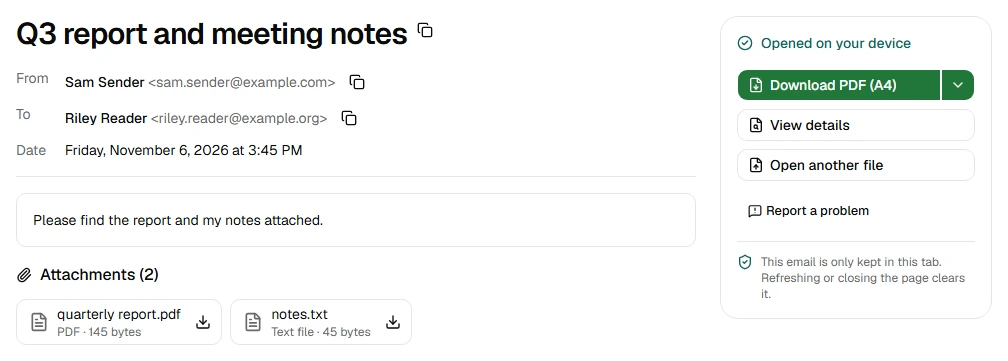
- Drop your .eml file on the box. The PDF downloads straight away, on A4 paper.
- Need US Letter or Legal paper? Click the arrow beside Download PDF (A4) on the same page and pick the size.
The PDF starts with the sender, recipients, date and subject, then the message and a list of attachments. Your files are processed on your device and never uploaded.
A PDF doesn't carry the attachments themselves. If they're needed too, download them from the viewer and send them alongside the PDF.
Option 2: save it from classic Outlook
If a system truly needs .msg, the most reliable way today is classic Outlook for Windows, if you still have it.
- Switch back to classic Outlook with the toggle in the new Outlook. If you use a work or school account and don't see the toggle, your admin may have turned it off.
- Double-click the email to open it in classic Outlook.
- Choose File → Save As, pick a folder and a name, and choose the file type in the Save as type list.
- Check that the saved file ends in .msg, then send it.
This works for emails that are still in your mailbox. If all you have is the .eml file, ask the person who sent it to you, or your IT team, for the original.
If you don't have classic Outlook, ask your IT team. They may have a way to export emails as .msg for the system that needs them.
Option 3: download it from Outlook on the web
Outlook on the web can also save an email from your mailbox as a file. Microsoft's steps:
- Open Outlook on the web and select the email, so it opens in the reading pane.
- Choose More actions → Download. You can also right-click the email in the list and choose Download.
- The file usually lands in your Downloads folder, named after the email's subject.
Microsoft says the file is saved as an .eml or .msg file, so look at the end of the name before you send it. If it's .msg, you're done. If it's .eml, Option 1 or Option 2 is your next step.
What Inboxglass can do today
Inboxglass can't turn an .eml file into a .msg file yet. It's on our plans, but we'd rather tell you that than send you away with a file that doesn't work. (The other way round works: MSG to EML turns a .msg into a standard .eml.)
What it can do with your .eml file right now, on your device:
- Open it in the EML viewer, with the sender, recipients, date, message and attachments, and save the attachments one by one or all together as a ZIP.
- Make a PDF with EML to PDF, on A4, Letter or Legal paper.
- Save the text with EML to TXT, or the email as a web page with EML to HTML.
It also opens .msg files, in the MSG viewer, if someone sends one to you.
No account needed, and nothing to install.
Sources
- Microsoft Learn: Stages of migration to new Outlook for Windows
- Microsoft Support: Save an Outlook message as a .eml file, a PDF file, or as a draft
- Microsoft Support: Open .eml, .msg, and .oft files in new Outlook and Outlook on the web
- Microsoft Support: Run new Outlook and classic Outlook side-by-side
Try the tool
EML viewer
Read .eml emails and save their attachments. No account needed.
Your files are processed on your device and never uploaded.
Also for this:EML to PDFMSG viewer