
Open an MSG file on Windows without Outlook
No Outlook on your PC and an .msg file won't open? How to read it in your browser, what the new Outlook can do, and how to save the attachments.
Quick answer
You can open an .msg file without Outlook by dropping it into a browser-based MSG viewer, which shows the email and lets you download its attachments. The new Outlook for Windows and Outlook on the web can also open .msg files, but Microsoft says that needs a qualifying Microsoft 365 subscription.
On this page (11)
- What is an MSG file?
- Can Windows open an MSG file on its own?
- How do I open an MSG file in my browser?
- Can the new Outlook for Windows open MSG files?
- How do I open an MSG file in Outlook on the web?
- Which way should I use?
- How do I save the attachments from an MSG file?
- How do I keep a copy I can open anywhere?
- How do I stop Windows asking which app to use?
- Why won't my MSG file open?
- Sources
Someone sent you an email saved as an .msg file, and your Windows PC doesn't know what to do with it. The quickest fix is to open it in your browser with our MSG viewer: drop the file in, read the email and save its attachments. Nothing to install, and no Outlook needed.
The rest of this guide explains why Windows struggles with these files, what Microsoft's own apps can and can't do, and how to keep a copy you can open anywhere.
What is an MSG file?
An MSG file is a single email saved by Microsoft Outlook. It holds everything in that email: the sender, the recipients, the date, the subject, the message and any attachments.
Classic Outlook for Windows can save an open email as a file with File > Save As, and Microsoft says Outlook on the web can save a message as an EML or MSG file. That's why people who use Outlook at work often send them to people who don't.
Inside, an MSG file isn't plain text. It's a small database in a format only some apps understand.
If you've also seen .eml files and wonder how they differ, our guide MSG vs EML explains it in a few minutes.
Can Windows open an MSG file on its own?
MSG is Outlook's format, and the Microsoft help pages about opening .msg files (listed under Sources) all do it with a version of Outlook.
An MSG file isn't a document or a text file, so apps made for those aren't built to read it.
So you need one of three things: a viewer that reads MSG files, an Outlook that can open them, or someone to send the email in another format.
How do I open an MSG file in my browser?
This is the method that works on any Windows PC, with or without Outlook, and without an account.
- Go to the MSG viewer.
- Drag your .msg file onto the drop area, or click Choose a file and pick it.
- The email opens on the page: sender, recipients, date, subject and the message itself.
- To save the attachments, click Download next to each one, or Download attachments (ZIP) to get them all at once.

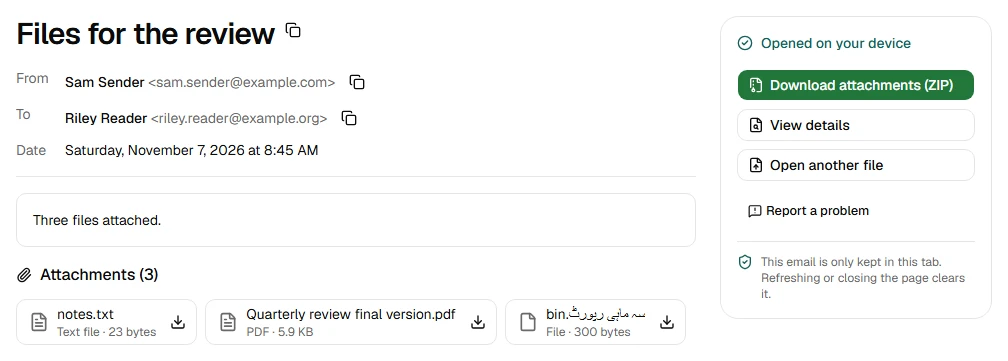
Your file stays on your device. The viewer reads the file inside your browser. Your files are processed on your device and never uploaded, and we can't see your emails. You can check this yourself with the steps on our Security page.
Pictures from the internet are hidden at first. Some emails load images from the sender's server, and loading them can tell the sender you opened the email. The viewer shows a Show images button so you choose, one email at a time.
Big files are fine. The viewer opens MSG files up to 50 MB. In our own test, a 49 MB MSG file opened without freezing the page: no single task on the page took longer than 50 milliseconds. That was a test file in Chrome on one laptop, so your times will vary.
Can the new Outlook for Windows open MSG files?
Sometimes. Microsoft says the new Outlook for Windows can open .msg files: drag the file from File Explorer onto the reading pane, or right-click it and choose Open with and then Outlook (new).
There's a catch. Microsoft's page says that "to open .msg and .oft files, your account needs to have a qualifying Microsoft 365 subscription". The page doesn't say which subscriptions qualify.
Microsoft also says the new Outlook is pre-installed on new Windows devices and on devices running Windows 11 version 23H2, so it's worth a try if you already sign in to it with a work or school account.
How do I open an MSG file in Outlook on the web?
Microsoft's page gives the same steps for Outlook on the web: open it in your browser, then drag the .msg file from File Explorer onto the reading pane. The same Microsoft 365 subscription rule applies.
This suits you if you already use Outlook on the web for work. If you don't have a qualifying account, use the browser viewer above instead: it needs no account at all.
Which way should I use?
Here's how the ways to open an MSG file compare.
| Way to open it | What you need | Shows the email | Saves attachments | To install |
|---|---|---|---|---|
| Inboxglass MSG viewer | A browser | Yes | Yes, one by one or as a ZIP | Nothing |
| New Outlook for Windows | A qualifying Microsoft 365 subscription | Yes | Not stated by Microsoft | Pre-installed on new Windows devices |
| Outlook on the web | A qualifying Microsoft 365 subscription | Yes | Not stated by Microsoft | Nothing |
| Classic Outlook | The classic Outlook app | Yes | Yes | The Office apps |
How do I save the attachments from an MSG file?
In the MSG viewer, every attachment has its own Download button with its original name. Download attachments (ZIP) saves them all in one file.
If an attachment is a type that can run code, like a program or a script, the viewer adds a note: "Only open attachments from senders you trust." That's a reminder, not a verdict on the file.
Got lots of MSG files and only want what's attached? Extract email attachments takes many emails at once and gives you one ZIP, with each file kept only once.
How do I keep a copy I can open anywhere?
An MSG file only opens in a few apps, so it's worth keeping the email in a format everyone can open.
- As a PDF: MSG to PDF turns the email into a PDF with its header, message and attachment list. Good for records and for sending on.
- As an EML file: MSG to EML makes a standard .eml that Thunderbird, Apple Mail and many other apps can open, attachments included.
Both run in your browser like the viewer.
How do I stop Windows asking which app to use?
If you've installed an app that opens MSG files, you can make it the default. Right-click the .msg file, choose Open with, then Choose another app. Pick the app and tick the option to always use it for .msg files.
You can also change it in Settings: go to Apps > Default apps, type .msg in the search bar, then choose the app.
If double-clicking opens an older Outlook than the one you use, Microsoft has a page on that too, linked below.
A browser viewer doesn't need to be the default app: you drop the file onto the page each time.
Why won't my MSG file open?
If the MSG viewer can't open your file, it tells you why. The most common reasons:
- It isn't really an MSG file. A file can be named .msg but hold something else, often because the download didn't finish. Save or download the email again.
- It's on a cloud drive or network drive. The browser may not be able to read it there. Save it to your PC first, then try again.
- It's larger than 50 MB. That's usually a whole mailbox, not one email. Open single emails instead.
- It's an Outlook template (.oft). Templates look like MSG files but were never sent. The OFT viewer opens them.
Still stuck? Report a problem. Never send us the email itself: we only need the error message and your browser.
If you're on a Mac rather than Windows, read How to open an MSG file on a Mac.
Sources
- Microsoft Support: Open .eml, .msg, and .oft files in new Outlook and Outlook on the web
- Microsoft Support: Save an Outlook message as a .eml file, a PDF file, or as a draft
- Microsoft Support: Start using new Outlook for Windows
- Microsoft Support: Change default apps in Windows
- Microsoft Support: Double-clicking a .msg file opens an unexpected version of Outlook
Try the tool
MSG viewer
Read Outlook .msg emails and save their attachments. No account needed.
Your files are processed on your device and never uploaded.
Also for this:MSG to PDFMSG to EML