
What is winmail.dat and how to open it
Got a winmail.dat instead of your attachments? What it is, why it happens, and how to get the files out on any device.
Quick answer
winmail.dat is a file Outlook can add when it sends an email in its own Rich Text format. It carries the email's formatting and often its real attachments, which other email apps can't unpack. Drop it into the winmail.dat opener to get the files out on any device.
On this page (6)
You were expecting an email with attachments: a document, a spreadsheet, some photos. Instead, there's a single file called winmail.dat, and nothing on your computer opens it. Your files are almost certainly inside it. This guide explains what it is, how to get the files out with the winmail.dat opener, and how the sender can stop it happening.
What winmail.dat is
winmail.dat is a container that Microsoft Outlook sometimes wraps around an email. When Outlook sends an email in Rich Text format, it packages parts of the message in a Microsoft format called TNEF. That package is the winmail.dat file, and it can hold the formatted text of the message and the regular attachments.
Microsoft says that email systems that aren't based on Microsoft Exchange might not be able to read this format. When yours can't, you get the plain text of the message and a winmail.dat attachment: the container instead of what's in it.
The file is not a virus, and it's not damaged. It's packaging your email app doesn't understand.
Sometimes the same package arrives with a generic name instead, such as ATT00001.dat. It works the same way.
Why you got one
The sender didn't do anything wrong on purpose. It usually comes down to a setting on their side:
- Their Outlook writes emails in Rich Text. Outlook can send emails as HTML, plain text or Rich Text. HTML is the default; Rich Text is the one that uses TNEF and can produce winmail.dat.
- Their company's mail server is set up that way. In Microsoft 365, admins can choose whether this format is used for one outside address or for a whole outside domain. So it can happen to you and not to others.
You don't need to know which one it is to get your files. But it helps when you ask the sender to fix it.
Get the files out
You can open winmail.dat in your web browser, on any device, without installing anything.
- Save the winmail.dat file from the email to your computer, for example to your Downloads folder.
- Go to the winmail.dat opener on Inboxglass.
- Drag the file onto the box, or click Choose a file and pick it.
- You'll see "We found 3 files inside winmail.dat" (or however many there are), with each file's name and size.
- Click Download next to a file, or Download attachments (ZIP) to get them all at once.
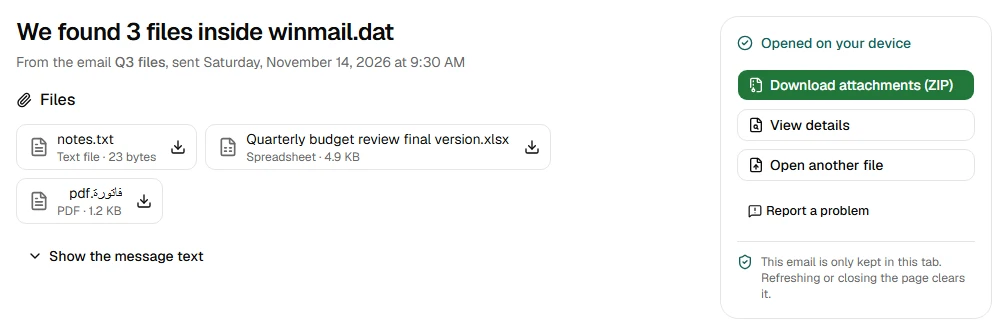
On a phone or tablet, the steps are the same. In Mail on an iPhone, touch and hold the winmail.dat attachment and choose Save to Files. In the Gmail app on Android, tap Download on the attachment to save it to your device. Then open the winmail.dat opener in your browser, tap Choose a file and pick it from there.
The files come out with their original names, byte for byte the same as the sender attached them.
Your files are processed on your device and never uploaded. That matters here: attachments are often contracts, invoices or personal documents.
If the email's text was also inside winmail.dat, you can read it with Show the message text.

As with any attachment, be careful with files that can run programs, such as .exe or .js files. Inboxglass shows a warning under these. Only open them if you trust the sender.
If there are no files inside
Sometimes the opener says: "There are no files inside this winmail.dat". That's normal, and nothing is missing.
It means the sender's email had no attachments. Outlook still added winmail.dat to carry the formatting of the message, and your email app showed it as an attachment because it couldn't read it.
The text of the email should already be in your inbox. If winmail.dat carried a copy, the opener shows it too.
If the opener says the file seems to be cut off, save it from the email again. Downloads sometimes stop part way, especially on a slow connection.
Stop it happening
The fix is on the sender's side. You can't change it from your end, but you can send them this short note:
Your emails reach me with a winmail.dat file instead of the attachments. Could you send them in HTML format instead of Rich Text? In Outlook it's under File → Options → Mail → Compose messages in this format.
That's where the default format lives in classic Outlook for Windows. Microsoft says that with HTML or Plain Text chosen there, Outlook doesn't use TNEF for new emails unless an Outlook feature needs it, such as a meeting request or voting buttons.
If it still happens after that, the setting may be stored on their company's mail server, for your address or for your whole domain. Their IT team can check.
Seeing winmail.dat complaints about emails you sent? Then the setting is on your side. Check the same option in your own Outlook and choose HTML. If you send from a work account and it keeps happening, ask your IT team to check the mail server setting mentioned above.
In the meantime, the winmail.dat opener gets your files out whenever one arrives. If someone sends you a whole Outlook email as a .msg file, the MSG viewer opens that too.
Sources
- Microsoft Learn: How Message Format Affects Email Messages
- Microsoft Learn: Specify the email message format that's used for external recipients to prevent Winmail.dat attachments
- Apple Support: Download email attachments in Mail on iPhone
- Google Help: Open & download attachments in Gmail
Try the tool
winmail.dat opener
Get the real attachments out of a winmail.dat. No account needed.
Your files are processed on your device and never uploaded.
Also for this:MSG viewer